Floating Logs Panel
In the Zscaler console, looking at the logs of a user or a rule means leaving the page you are on, opening the log viewer, and rebuilding the filter by hand. The Floating Logs Panel does it from where you are: View Logs on an entity opens a panel over the console, already filtered on that entity, and it stays there while you keep working on the page underneath.
It is for the admin who is checking a change, chasing a ticket, or simply wants to see what a rule is doing right now.
When to use it
- After a change: open the logs of the rule you just edited and watch what it does.
- On a ticket: the logs of the user, the location or the cloud app, without leaving the page.
- Side by side: two panels on two entities, or the same query before and after a change.
- From the Troubleshooting Engine: move an Insights query out of the drawer and keep it on screen while you fix what it found.
Where to find it in the UI
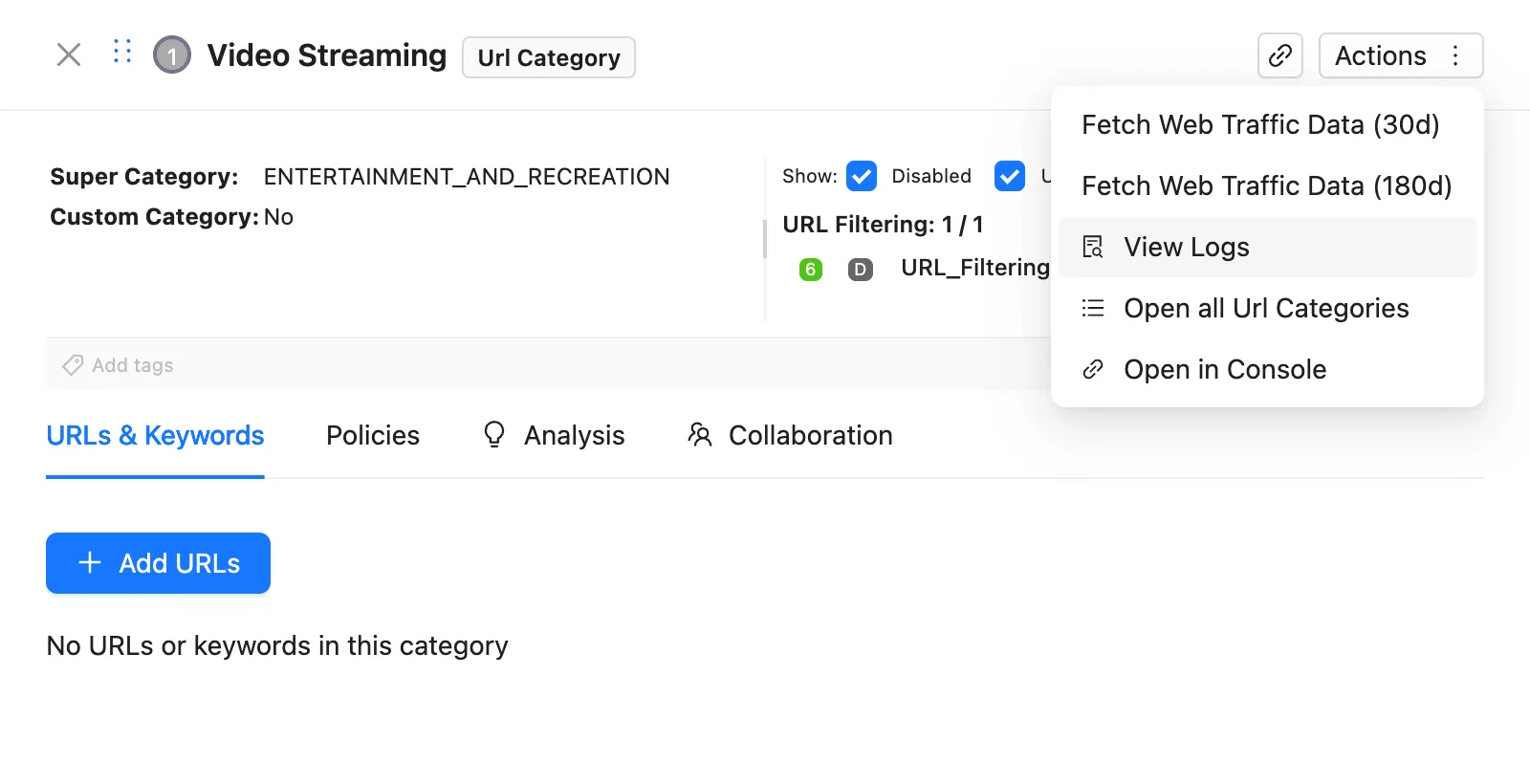
View Logs is in the Actions menu of these entities:
| Entity | Opens on |
|---|---|
| User, location, department | ZIA Web |
| URL category, cloud app, URL | ZIA Web |
| URL filtering rule, SSL inspection rule, cloud app control rule | ZIA Web |
| Firewall rule | ZIA Firewall |
From the Troubleshooting Engine, Open in panel in the Insights tab moves the current query and its results into a panel and closes the drawer.
The panel needs the full licence: it is not included in the trial.
Step by step
- Open the Actions menu of an entity and choose View Logs. The ZHERO Logs panel opens over the console, with the entity already in the criteria.
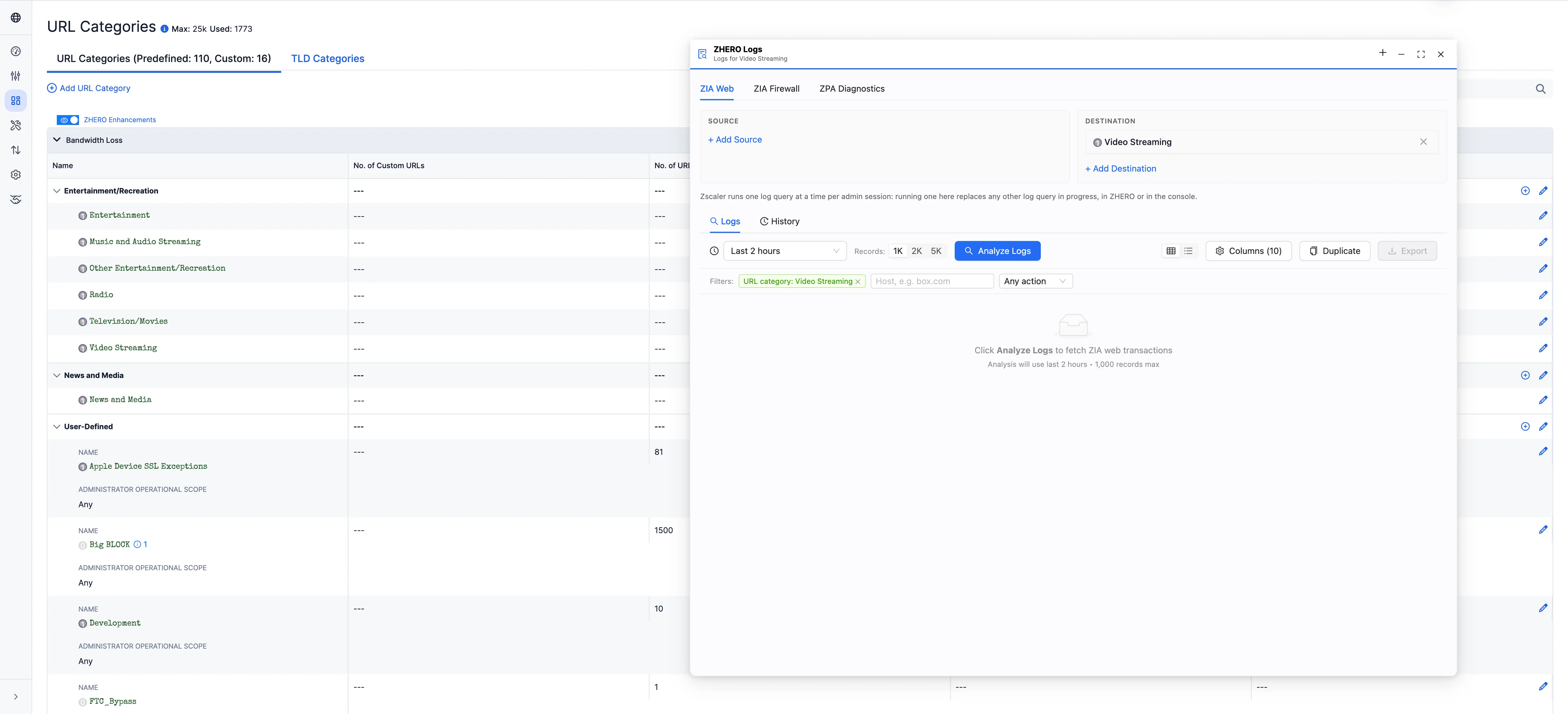
- Check the criteria and the time window. The query has not run yet.
- Press Analyze Logs. The panel never runs a query by itself: Zscaler allows one log query at a time per admin session, and an automatic run would replace the one you may already have running.
- Triage the results with the column filters (see below).
- Keep working. Move the panel where it does not cover what you need; the console underneath stays usable.
If the panel already holds work when you open View Logs on another entity, ZHERO asks whether to Replace it or Keep current.
Tabs and panels
Each panel has three tabs:
- ZIA Web: web transactions.
- ZIA Firewall: firewall sessions.
- ZPA Diagnostics: ZPA sessions, where ZPA diagnostics are enabled for your tenant. This is the same engine as the ZPA Diagnostics Engine, in the same window.
Each tab has its own Logs and History sub-tabs.
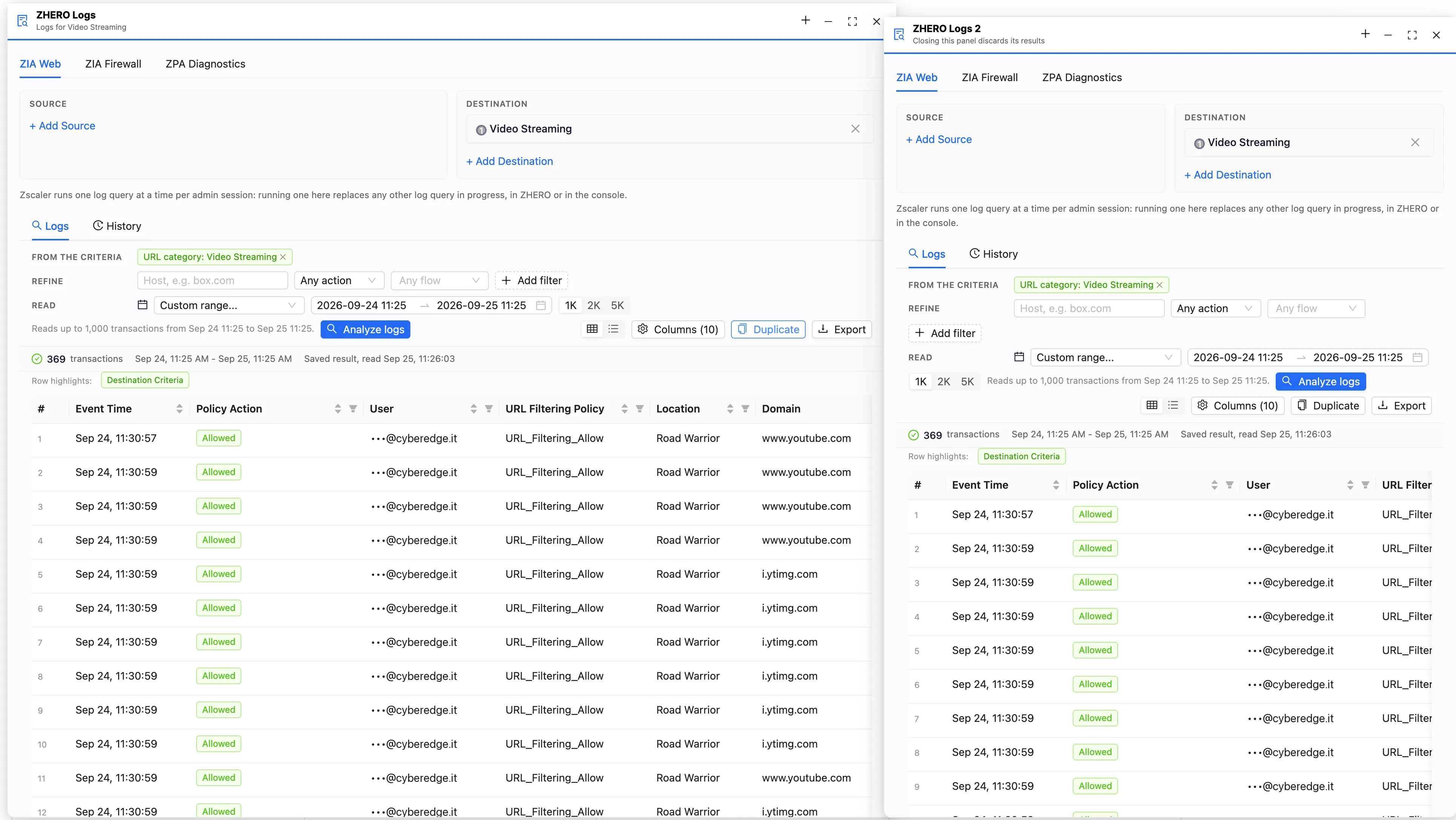
You can keep several panels open at once. Duplicate copies the current panel with its query; the + in the header opens a new empty one. Copies are numbered (ZHERO Logs 2, ZHERO Logs 3). Closing a copy discards its results, so save what you want to keep first.
History
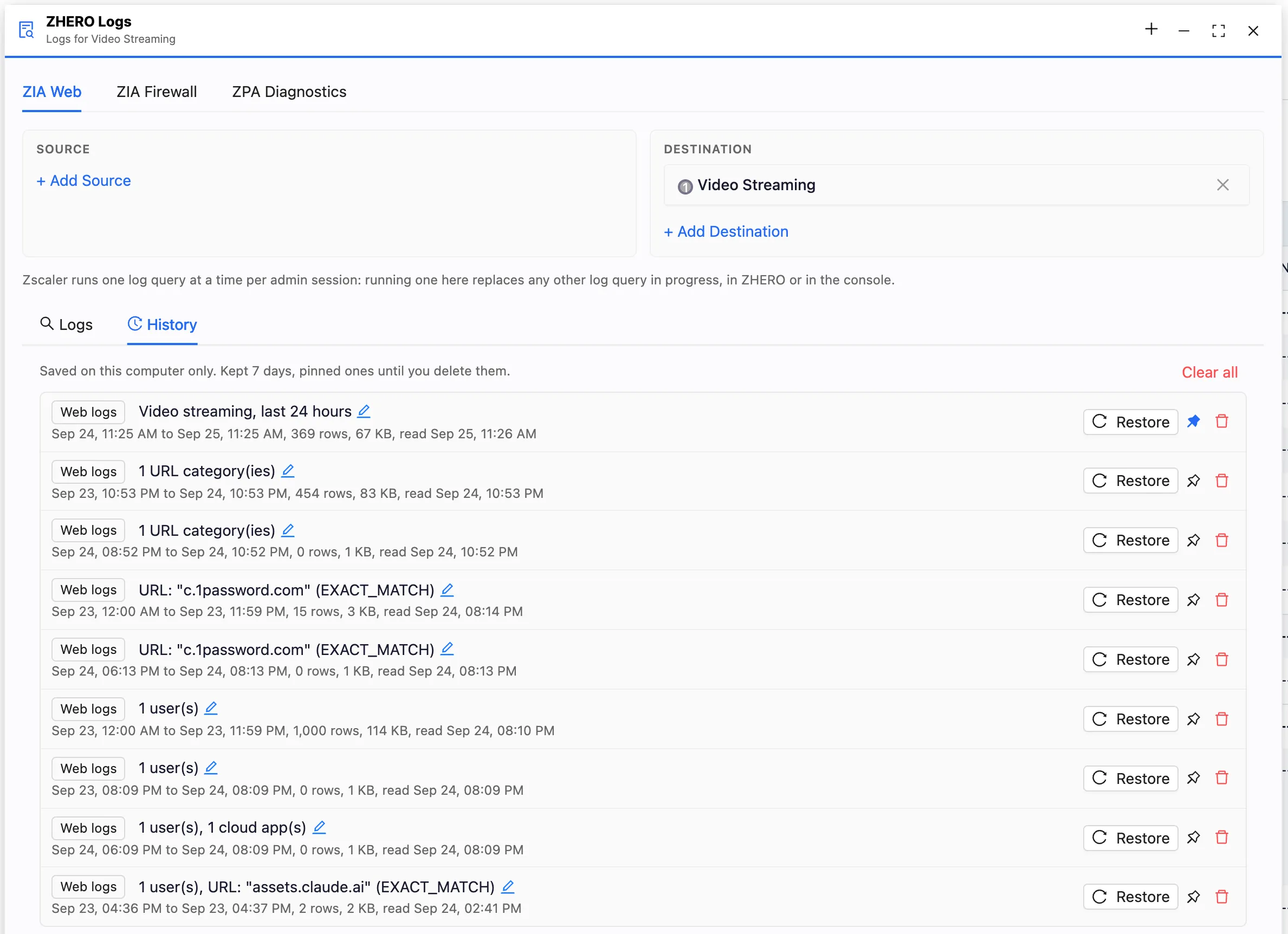
Every query you run is saved in the History sub-tab of its tab. From there:
- Restore reopens a query with its results, without running it again, and puts its source and destination back in the criteria.
- The pin keeps it. Unpinned entries are kept for 7 days, up to the latest 10; pinned entries do not expire.
- The pencil gives it a name of your own, so “Finance VPN check before the change” is findable next week.
Naming makes an entry findable; pinning is what keeps it.
Log tables
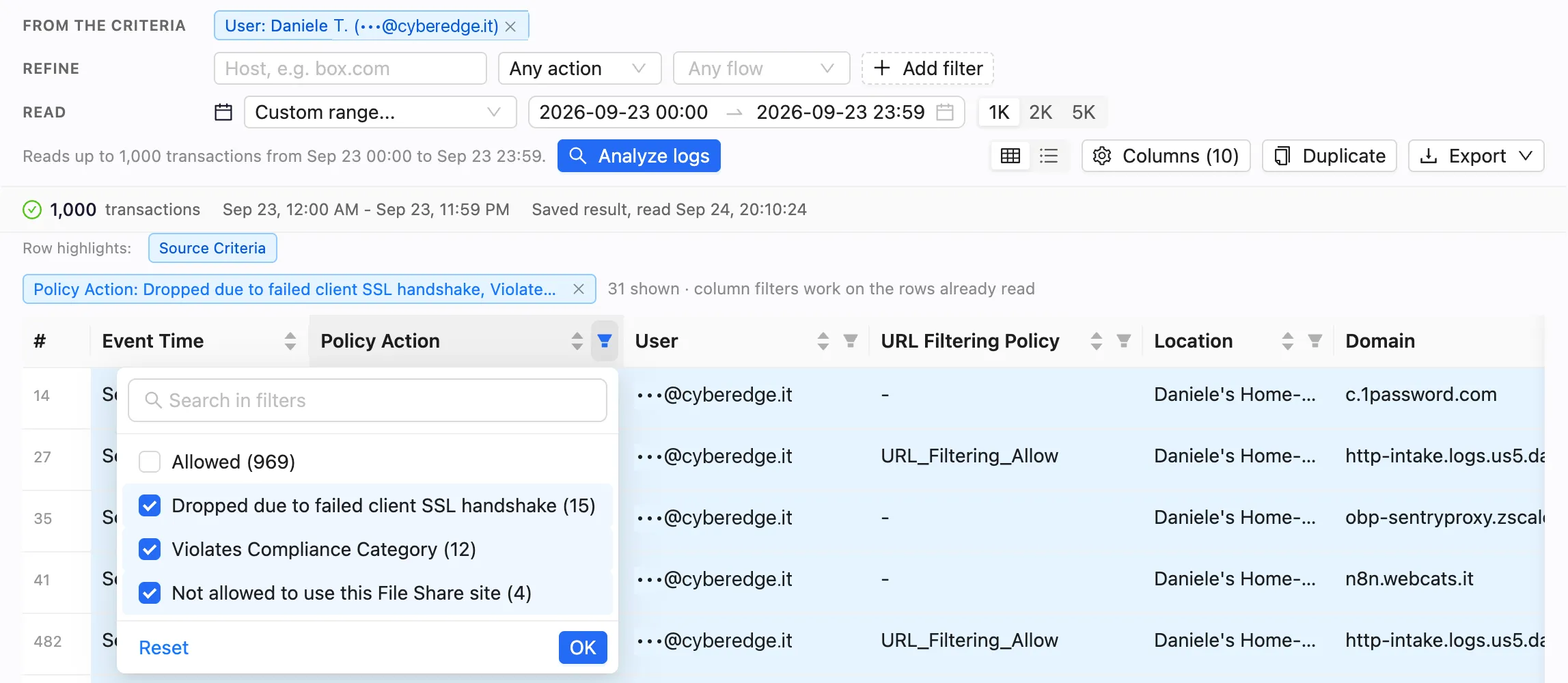
The log tables, in the panel and in the Troubleshooting Engine, are built for triage:
- Policy Action: a column with the action as the console shows it, so you read the same words you would read in Zscaler.
- Filters on every column, listing each value with how many rows carry it. “Which categories were blocked, and how often” is one click. The filters work on the rows already read, without a new query: the line above the table says how many are shown.
- Export to Excel. With filters on, choose between Filtered rows and All rows, and hand over exactly what you are looking at.
- Firewall filters by destination IP and by network application.

Searching a host
How you write a host decides how it is searched:
| You type | ZHERO searches |
|---|---|
www.example.com | Exactly that host. This is the fastest search the log server offers |
*.example.com or .example.com | Every host ending in example.com, the domain itself included |
Anything else, such as example | Every host containing that text |
An exact host is answered much faster than a partial one, so type the full name when you have it.
What to watch
- The criteria before Analyze Logs. The panel opens filtered on the entity you came from; check that the window is the one you want before running.
- Filtered or all rows when you export. The menu tells you how many rows each option contains.
- One query at a time. If you run a query in a panel while another is running in the drawer, the older one stops. That is a Zscaler rule, not a ZHERO one.
Limits and notes
- It needs the full licence. On a trial, View Logs stays in the menu and opens a panel describing the feature instead.
- The tenant needs ZIA. On a ZPA-only tenant the panel is not offered; use the ZPA Diagnostics Engine.
- View Logs on a user needs a user known to ZIA.
- History is stored locally in your browser, and does not follow you to another machine.
- The panel reads, it does not change anything.
FAQ
Why does the panel open without results? By design. It is pre-filled and waits for Analyze Logs, so it never replaces a log query you already have running elsewhere.
How many panels can I open? As many as you find useful. In practice two or three: one per question.
Can I keep a panel open while I edit a rule? Yes. That is the point: the panel floats over the console, and the page underneath stays usable.
Where did the entity I started from go? It is in the panel’s criteria. Change or remove it there to widen the query.
Related pages
- Troubleshooting Engine: the verdict, and the Insights tab the panel shares its tables with
- Log Investigation: several log reads in sequence for one ticket
- ZPA Diagnostics Engine: the ZPA tab, in depth
- Floating Entities Panels: the same idea for entity lists
Next steps
- Open the Actions menu of a rule you changed recently and choose View Logs
- Run the query and filter the Policy Action column
- Duplicate the panel and point the copy at another entity
- Pin the query you will want to see again