Tags & Comments
ZHERO’s Collaboration system lets your team tag, comment on, and share insights about any Zscaler entity: policies, URL categories, application segments, users, and more. The context lives next to the configuration itself, so “why is this configured this way?” always has an answer, right where the question comes up.
Overview
Entity collaboration adds a team layer on top of your Zscaler configuration:
- Collaborative Tags: create and assign custom tags to any entity
- Public / Private Visibility: tags can be team-visible or personal
- Entity Comments: threaded comments on any entity for context sharing
- Preferred Tags: highlight the tags that matter in entity cards and inline views
- Real-Time Sync: colleague updates appear instantly, no refresh needed
- TenantAdmin Moderation: admins can manage comments across the organization
- Activity Hub: a central view of tag statistics, assignments, and recent activity
- Default Tags: a starter set (Review Needed, Approved, Deprecated, and more) is pre-configured when you activate the feature
The Collaboration Tab
Every entity drawer in ZHERO includes a Collaboration tab. It brings together the three collaboration primitives for that specific entity:
- Tags: assigned tags, plus one-click assignment from the available tags
- Comments: the threaded discussion attached to the entity
- To-dos: tasks linked to the entity, with a quick-add field (see Shared To-Do Lists)
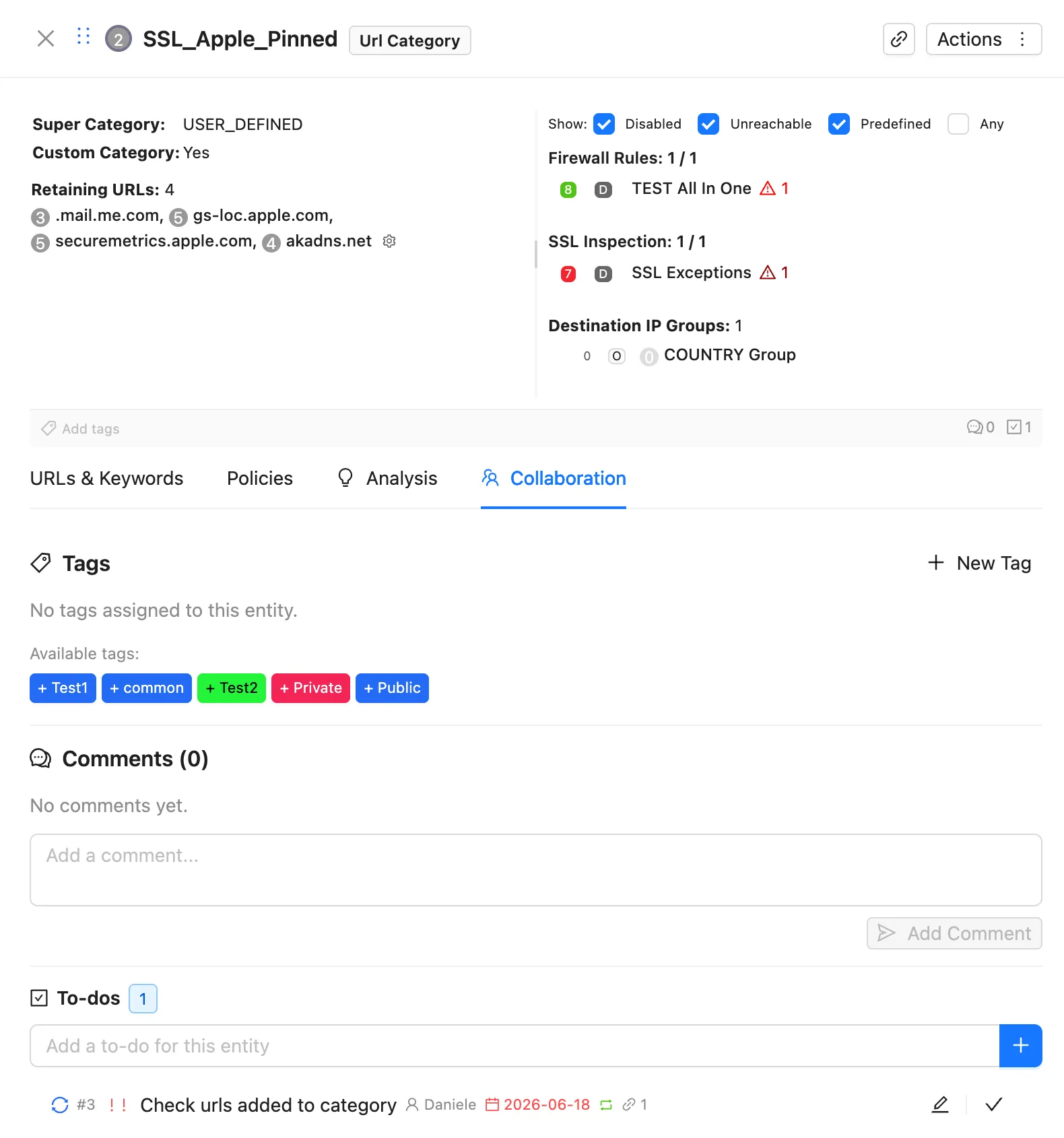
The tag bar at the top of the drawer also shows comment and to-do counters, so you can see at a glance whether an entity carries collaboration context before opening the tab.
Working with Tags
Creating and Assigning Tags
- Open any entity and switch to the Collaboration tab (or use the tag bar)
- Click New Tag to create a tag, or click any available tag to assign it
- The tag is immediately visible to your team on that entity
Visibility and Preferred Tags
- Public tags are shared with your tenant group: everyone sees them on the entity
- Private tags are personal: use them for your own working sets and reminders
- Preferred tags are highlighted in entity cards and inline views, so the most important status (for example “Critical Do Not Modify”) is never buried
Typical Tagging Workflows
Policy review status: use tags like “Needs Review”, “Approved”, “Exception” to track an audit across hundreds of rules. Each analyst tags what they review; the senior admin filters by tag and signs off by switching the tag to “Approved”.
Working sets: tag the entities involved in a migration or cleanup project, and every teammate sees the same scope directly in the console.
Working with Comments
Comments are threaded discussions attached to a single entity:
- Open the entity’s Collaboration tab
- Write your comment and click Add Comment
- Teammates see it in real time, on the same entity, wherever they open it
Shift handoff: a night-shift admin documents an in-progress SSL Inspection investigation in a comment and tags the entity “Investigation In Progress”. The day shift picks it up with full context, without a single status meeting.
Knowledge preservation: document why a firewall exception exists directly on the rule. Two years later, when someone asks “why is this here?”, the answer is attached to the rule itself, not lost in an old email thread.
The Collaboration Hub
The Collaboration drawer gives you the team-wide view, beyond a single entity:
- Activity: tags and comments grouped by entity, sortable by recent activity, so you can catch up on what the team touched while you were away
- Config: tag management and feature settings
- Audit Trail: every collaboration action (tag changes, comments, and more) is logged with actor, action, and target, and can be exported for compliance
- Data Health: statistics and hygiene checks on your collaboration data
Related Features
- Shared To-Do Lists: turn entity-level context into tracked, assignable action
- Shared Pending Changes: share proposed configuration changes with your team for coordinated review and execution
- Collaboration Audit Trail: the complete, exportable log of collaboration and change management activity
Next Steps
- Enable Collaboration for your tenant group
- Review the default tags and add the ones your team’s workflows need
- Pick one recurring pain point (policy reviews, shift handoffs, exception documentation) and move it onto tags and comments
- Add Shared To-Do Lists when annotation needs to become tracked work