Shared To-Do Lists
Shared To-Do Lists put your team’s task tracking exactly where the work happens: inside the Zscaler console, linked to the entities the tasks are about. Instead of a spreadsheet or an external board that drifts out of date, the to-do lives next to the policy it refers to, and whoever opens that policy sees it.
Overview
- Lists, Sections & Kanban: organize work in named lists with sections, or switch to a board view to manage it by status
- Rich To-Do Fields: status, priority, due dates, blockers (one to-do waiting on another), and recurrence for periodic checks
- Smart Quick-Add: create a fully-formed task from a single natural-language line
- Entity Linking: link any to-do to one or more Zscaler entities, with a to-do badge shown directly on the entity wherever it appears in the console
- Comments & Entity Mentions: threaded comments on a to-do, where
@mentions a Zscaler entity by name and links the comment to it. Mentions address entities, not people: to put work in front of a person, assign the to-do to them - Flexible Assignment: assign to console admins (they see their to-dos at login) or to external people entered by name
- Notifications, Archiving & Audit: in-app change notifications, archiving of completed work, and full coverage in the Collaboration Audit Trail
- Findings to Action: turn an analysis or remediation finding into a to-do in one click
The To-Dos Tab
Open the Collaboration drawer and switch to the To-dos tab. The List view shows your lists with their sections, and every to-do with its priority, assignee, due date, recurrence and linked entities:
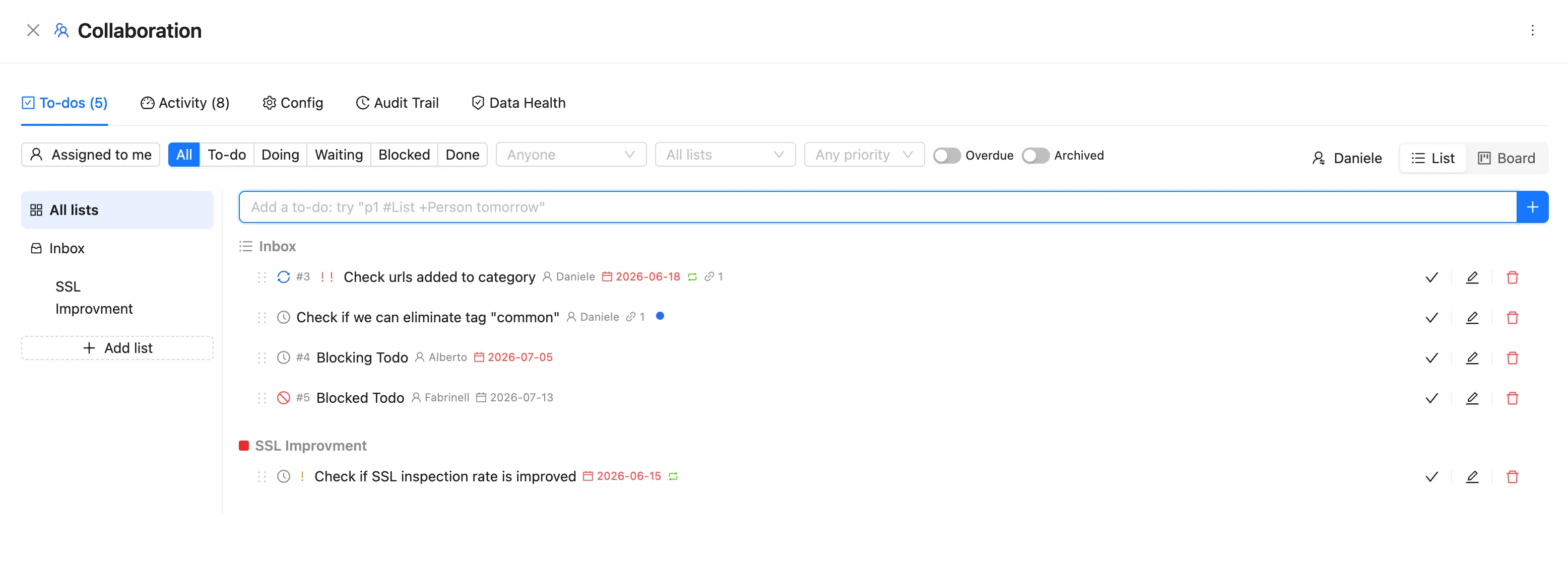
The filter bar lets you slice the same data by status, assignee, list, and priority, plus dedicated toggles for overdue and archived items. Assigned to me narrows everything down to your own plate.
Quick-Add in Natural Language
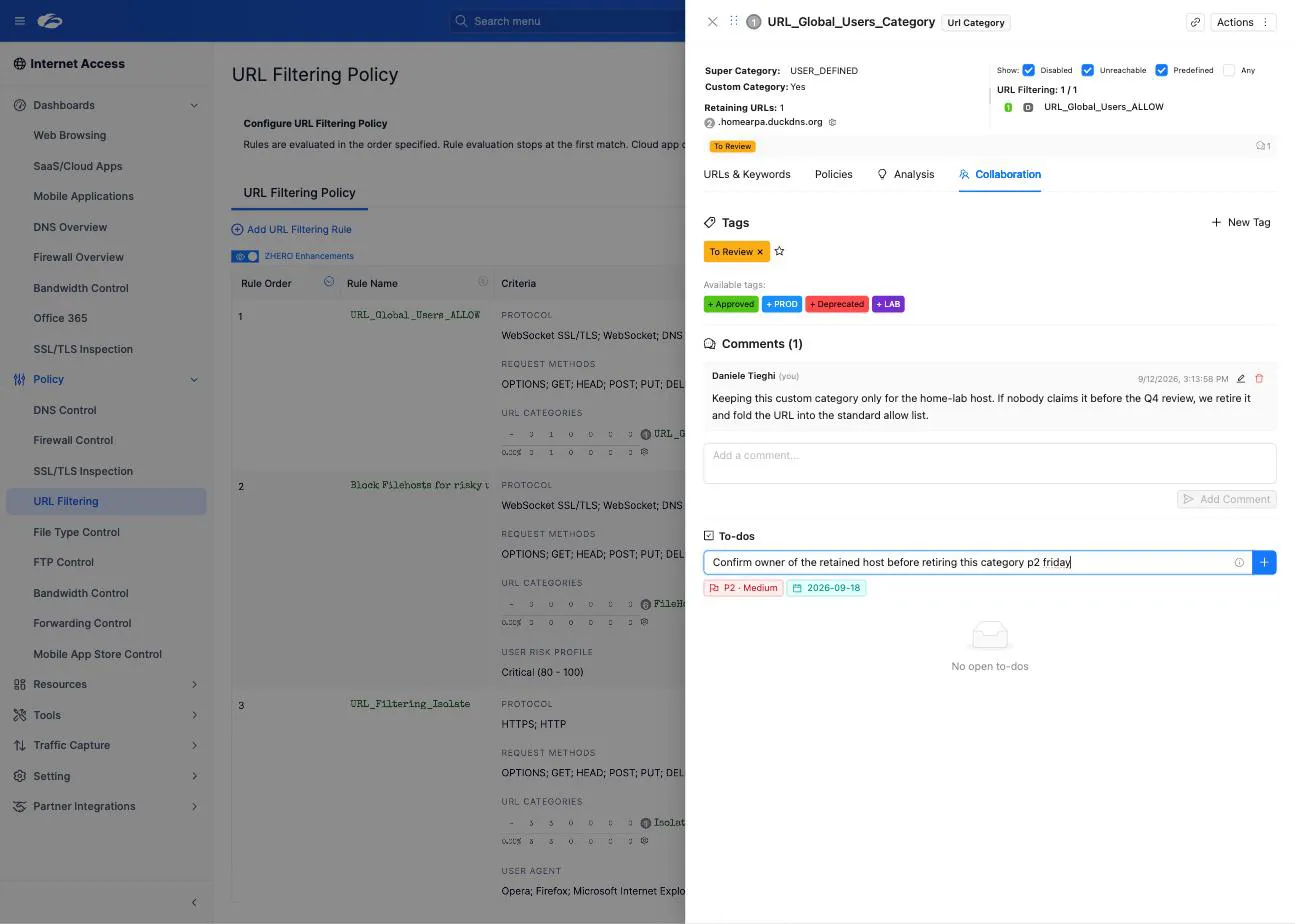
The quick-add field turns one line into a complete task. Type, for example:
Review SSL exceptions p1 #Hardening +Alberto tomorrowand ZHERO creates a to-do titled “Review SSL exceptions” with priority 1 (p1), in the
“Hardening” list (#), assigned to Alberto (+), due tomorrow. No form to fill in.
Recurrence and Blockers
- Recurring to-dos regenerate automatically: use them for periodic controls like a monthly PAC file review or a quarterly policy audit
- Blockers express dependencies: a to-do can be blocked by another, and the board makes the chain visible instead of letting it hide in someone’s memory
The Board View
Switch from List to Board to manage the same to-dos as a kanban, by status: To-do, Doing, Waiting, Blocked, Done.
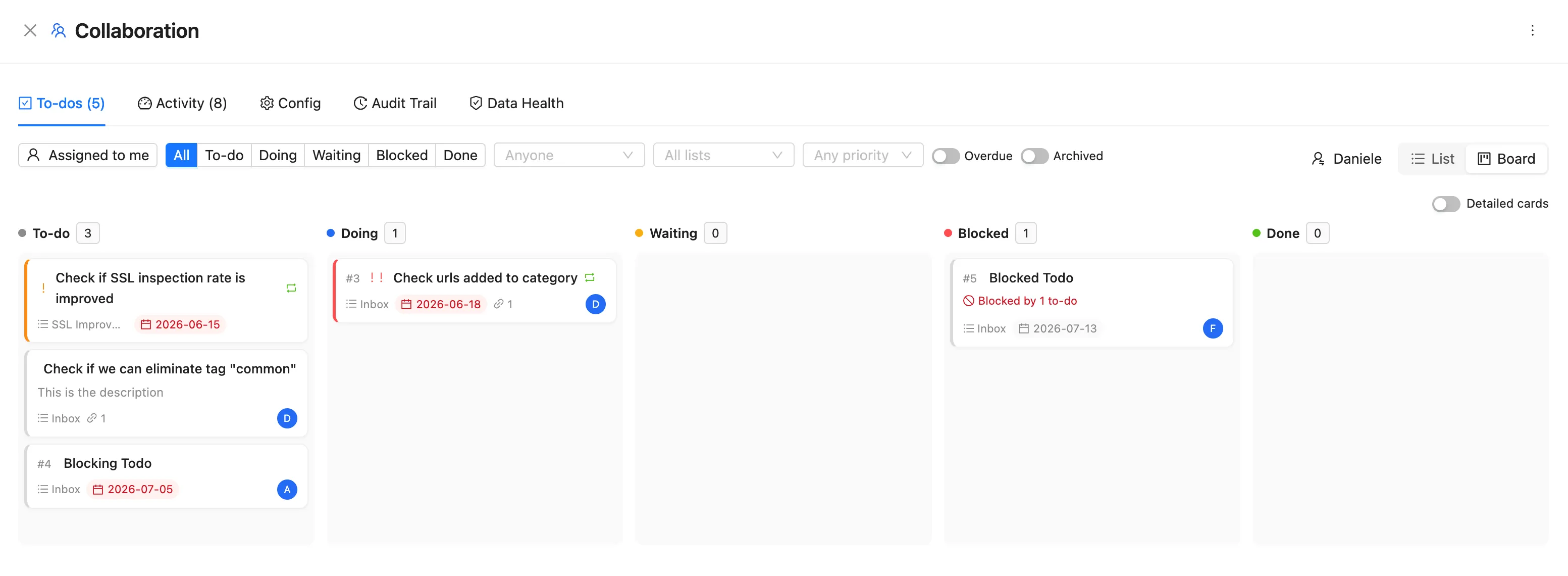
Cards carry the essentials (list, due date, assignee, blocked-by), and the Detailed cards toggle expands them when you want more context. Drag a card to change its status.
Entity Linking: Work That Finds You
Linking is what makes these to-dos different from an external tracker. A to-do can be linked to one or more Zscaler entities, and the link works in both directions:
- from the to-do, jump straight to the entity it is about
- on the entity, a to-do badge appears wherever the entity is rendered in the console
For example, a URL category with an open to-do shows the badge even when it appears inside an SSL Inspection policy:
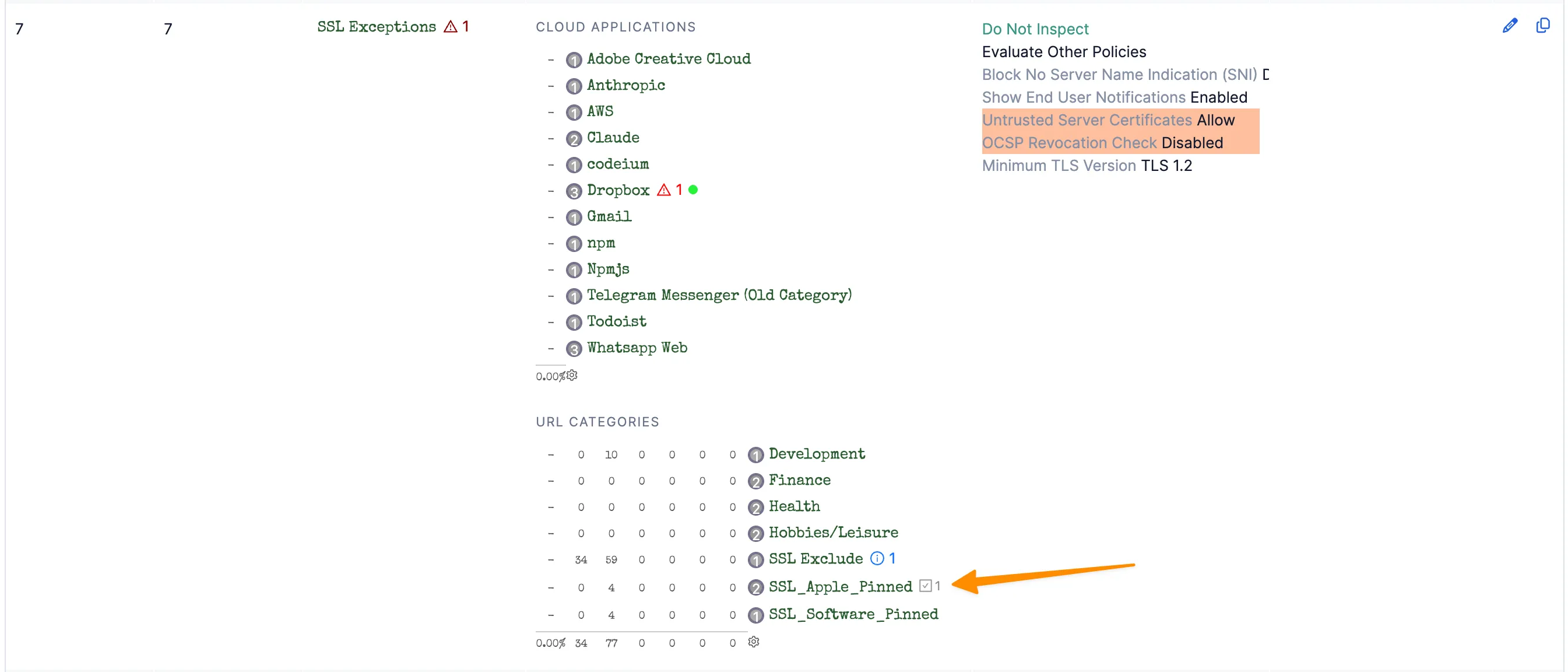
This is the “right information at the right moment” principle: the admin who opens that policy next month does not need to know the to-do exists, because the console tells them. The work finds the person, instead of the person having to remember the work.
Every entity drawer also has a per-entity quick-add in its Collaboration tab, so you can jot a task down without leaving the entity you are looking at.
From Findings to Action
Shared To-Do Lists close the loop between assessment and execution: where ZHERO surfaces a finding (a Smart Analysis result, a fleet remediation item), you can turn it into a to-do in one click, already linked to the affected entity. Drop it into the right list, assign an owner, set a due date, and the finding has become tracked work instead of a line in a report.
See Analysis Templates for how findings are produced in the first place.
Typical Workflows
Remediation after an assessment: a posture review surfaces a set of overly broad rules. The lead creates one to-do per rule, each linked to the affected policy, in a “Hardening” list with owners and due dates. From then on, anyone who opens one of those rules sees the badge and the pending work.
Shift and meeting handoff: instead of opening every call with “who was supposed to do what?”, the board is the shared state. In-progress items sit in Waiting or Blocked with a comment mentioning the next owner, and the meeting starts from the board instead of rebuilding it from memory.
Consultant or MSP working with a customer: a shared list between partner and customer admins keeps both sides on the same board, inside the console, with the entities linked. External collaborators who never log in can still be assigned by name.
Single admin: even alone, entity-linked to-dos work as memos that resurface in the right place, and recurring items keep periodic checks honest.
Audit and History
All to-do activity (creation, status changes, assignment, execution) is covered by the Collaboration Audit Trail, with actor, action and target. TenantAdmins can filter it and export it to Excel for compliance documentation. Completed work can be archived to keep lists clean without losing history.
Related Features
- Tags & Comments: the annotation layer of the same Collaboration system
- Collaboration Audit Trail: the complete, exportable log of collaboration activity
- Analysis Templates: the findings that one-click conversion turns into to-dos
Next Steps
- Enable Collaboration for your tenant group
- Create your first list around a real goal (a hardening round, a migration, a recurring review) rather than a generic inbox
- Link every to-do to the entities it is about: the badges are what make the system pay off
- Move your next assessment’s findings into to-dos and track the remediation on the board