Trial, Licence and Terms
ZHERO installs and starts working on your own tenant, on real configuration, without a sales conversation first. This page explains what that trial covers, where it stops, and what the terms acceptance in the console is doing.
The 30-day trial
The trial starts automatically the first time ZHERO initialises on a tenant that is not licensed, and runs for 30 days. There is nothing to activate.
What works fully
- The console enhancements: badges, hover cards, the drill-down drawer, everywhere
- Universal search, with no restriction
- Entity lookups and the relationships between them
- Configuring exports: every column, template and option in the drawer
- Viewing pending changes: the queue, the diffs, the PDF export
- The first analyses: the analysis surface works and its results are visible for the first three templates
- Your posture score: the Global, ZIA, ZPA and ZCC gauges in Posture Insights, with their grade and severity chips, the score chips in the Analysis Engine drawer header, the ZCC Executive Summary including a live Run Fleet Assessment, and the ZPA Map and Topology, plus the ZPA Overview KPIs where it is enabled (coming soon)
What is held back
| Surface | During the trial |
|---|---|
| Analysis results | The templates are all listed, but full results are shown for the first three only. The rest are blurred, in the drawer and in the entity Analysis tab. Contextual filters are off, so the order is fixed. The template list under the posture score shows those same three, not a different selection |
| The tabs that explain the score | Seven sub-tabs open the upgrade modal instead of their content: Improve and Trends under Posture Insights, Fleet Telemetry, Profile Analysis, Profile & PAC Compare and Remediation under ZCC, Fleet status under ZPA |
| Running an on-demand analysis | The SSL Coverage sub-tab under ZIA stays visible; starting or re-running its investigation opens the upgrade modal |
| Apply and change actions on findings | Blocked, with an explanation |
| Export downloads | Configure freely, a banner warns you, and the download button opens an upgrade prompt |
| Executing pending changes | The drawer works and shows everything; execution opens an upgrade prompt |
| Collaboration | The button opens a preview of what the feature does |
| Troubleshooting Engine | Same: a preview instead of the drawer |
| Settings | Read-only |
You get the verdict, not the explanation. This is the one sentence worth keeping. The score is computed over your whole tenant, including the templates a trial cannot open, so the number and the grade are true and complete rather than a sample. What the trial holds back is the reasoning behind it: which checks moved it, by how much, and in what order to fix them.
A gated tab does not disappear. It stays in the tab bar, and clicking it opens the upgrade modal headed with the feature you were trying to reach. That is deliberate: you see the real size of the product rather than a smaller one with things quietly missing.
The gating works card by card, not section by section. A blurred finding keeps its severity and its title readable and blurs the body, with a line across it offering to unlock the rest. A crown marks what the full version opens up, so you can tell before clicking which parts are gated.
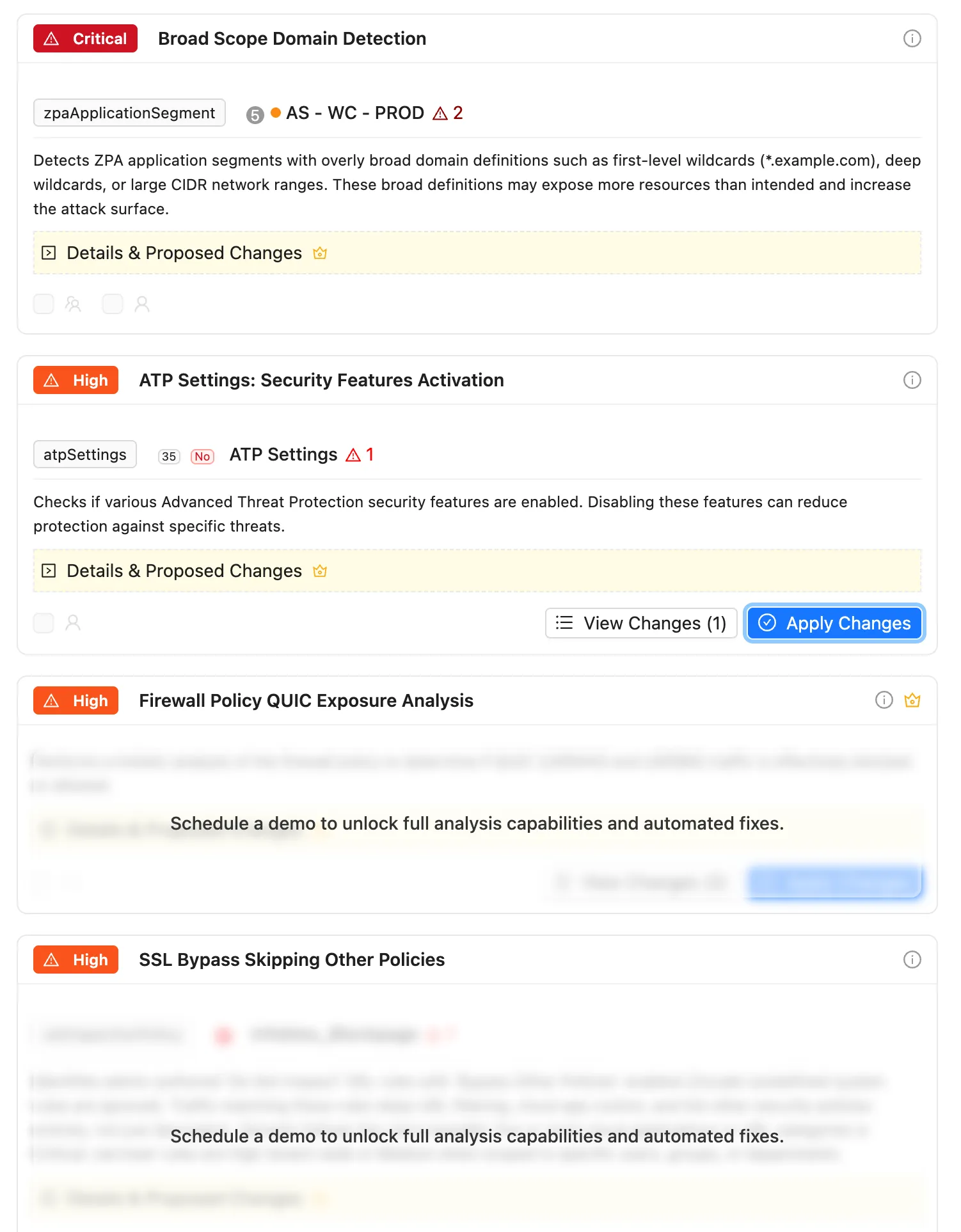
The pattern is deliberate: nothing is hidden from you, and nothing is written to your Zscaler tenant. You can see the whole shape of the product on your own configuration, and the gates sit exactly where a change or a download would happen.
Run Fleet Assessment is the one control that might look like an exception, and it is not. It reads your ZCC configuration and your device list, computes the scores and stops: there is no write call to Zscaler anywhere in it. The device and configuration data it gathers stay in your browser, and during a trial even the derived scores stay there, because the only thing ZHERO would otherwise sync (the four vertical sub-scores, the composite and the grade, never device data) goes to the team collaboration backend, which a trial does not have.
The countdown
Once a day, on the first page load after midnight UTC, ZHERO shows the trial countdown: days remaining, the start and end dates, and a progress bar. Under seven days it becomes more insistent. It cannot be postponed past the current day, and it carries a link to book a demo.
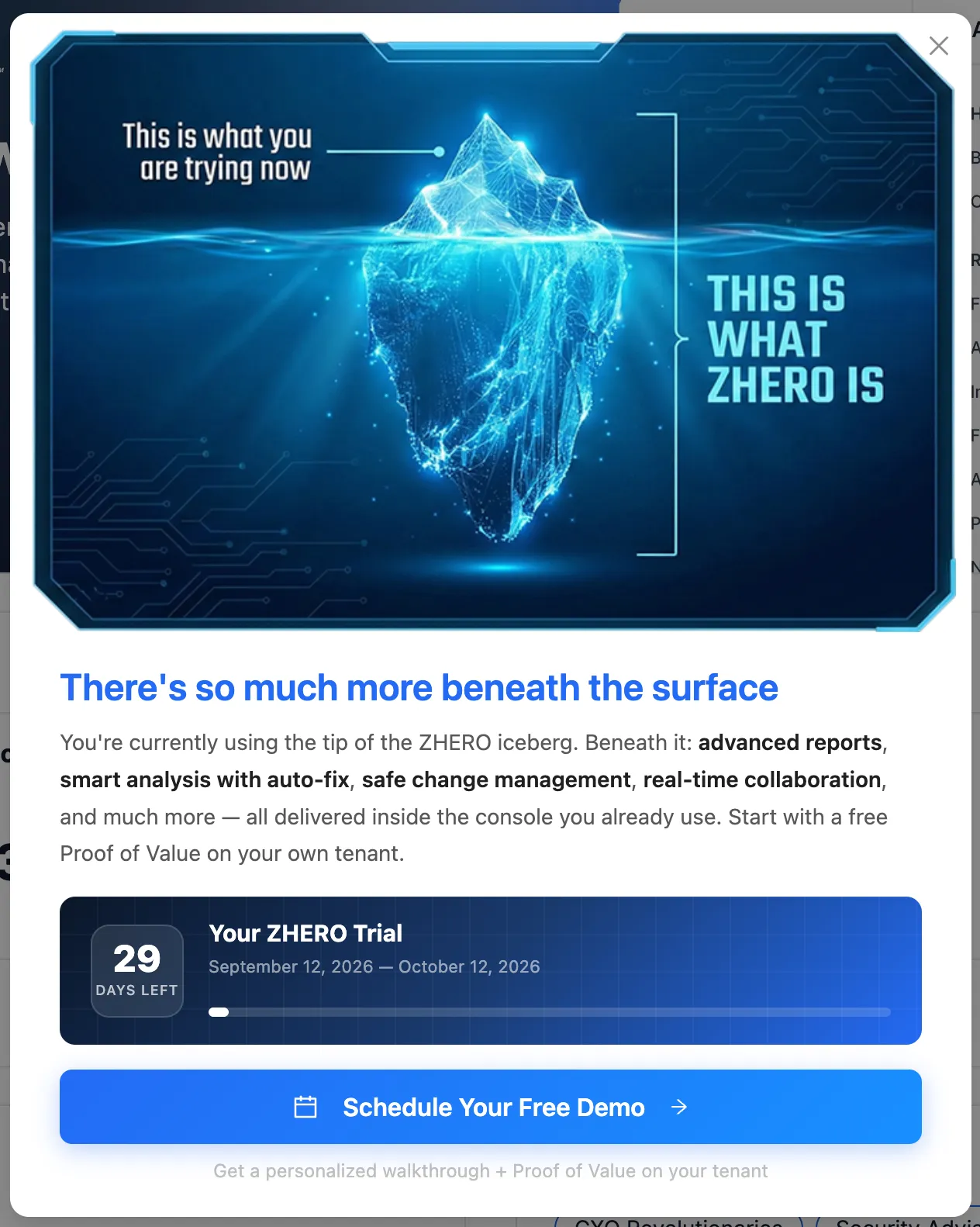
The ZHERO icon stays visible throughout, in the top right. During the trial, clicking it opens the countdown; hovering offers to hide it for 10 seconds or for the session.
When the trial expires
ZHERO stops offering its gated capability and the icon opens the expiry modal instead of the menu. It names what you no longer have: smart analysis, the advanced Excel and PDF reports, universal search, the entity badges and hover insights, and the pending-changes queue. The modal offers a call to arrange a two-week full activation or to discuss pricing.
Nothing is deleted, and nothing about your tenant changes: ZHERO has never written anything you did not execute yourself.
Moving to the full version
The full version lifts every gate above: all analysis templates with their results, export downloads, execution of pending changes, Collaboration, the Troubleshooting Engine, and writable settings. It is a licence on the tenant, so it applies to everyone who uses ZHERO there, not per seat on your machine.
Both the countdown and the expiry modal carry the booking link. Nothing needs to be reinstalled when the licence lands: the extension picks it up on the next initialisation.
Terms acceptance
ZHERO asks you to accept its terms before it initialises on a tenant. This is not a formality in the interface sense: until the terms are accepted, ZHERO does not initialise at all, no analysis, no API calls, no features.
- First activation on a tenant presents the documents for acceptance.
- Subsequent users on the same tenant follow the acceptance already recorded for it, according to their role, with MSP and partner access handled explicitly.
- When the terms are updated, a new acceptance is required. Between publication and the effective date there is a grace period: ZHERO keeps working normally and shows a dismissible notice, and the ZHERO menu gains a Terms updated entry at the top with the days remaining and a Review Now link.
- Acceptances are recorded with their version, so what you accepted and when is auditable.
The current documents are published at help.zhero.ai/legal.
What to watch
- The trial is per tenant, not per person. It starts when the first unlicensed user initialises on that tenant, so a colleague who installed ZHERO last week has already started the clock.
- A blurred analysis is not an empty one. During the trial the counts are real; only the details beyond the first three templates are held back.
- Use the trial on your real tenant. ZHERO writes nothing by itself, and the findings on a demo tenant are not the findings that make the decision.
- Do not let the grace period run out on a terms update: when the effective date passes without acceptance, ZHERO stops initialising.
Limits and notes
- Trial duration is 30 days from first initialisation on the tenant.
- The countdown appears once per day, at the day boundary in UTC.
- Licensed tenants never see trial information, regardless of any trial data that existed before the licence.
- Search is deliberately unrestricted during the trial.
- Anything gated shows an explanation and a route forward, never a silent failure.
FAQ
Does ZHERO change anything in my tenant during the trial? No. Execution of pending changes is blocked during the trial, and outside the trial nothing is ever written without you executing it.
Can I extend the trial? Trial management is handled on the ZHERO side. The booking link in the countdown is the route to that conversation.
My colleague installed ZHERO last month. Do I get my own 30 days? No. The trial belongs to the tenant and started then.
What happens to my pending changes when the trial expires? Your personal queue lives in your browser and is not deleted. It simply cannot be executed until the tenant is licensed.
Why did ZHERO stop working entirely after a terms update? Because the grace period ended without acceptance. Accept the updated terms and initialisation resumes.
Where do I read the terms? At help.zhero.ai/legal, and from the Review Now link in the ZHERO menu when an update is pending.
Related pages
- Installation Guide
- Getting Around ZHERO
- Legal documents
- Enabling Collaboration: one of the capabilities the full version unlocks
Next steps
- Install ZHERO on the tenant you actually work on
- Let the first analysis run and read the findings it can show you
- Configure an export fully, to see the shape of the report before the licence
- Book the demo from the countdown when you want the gates lifted